How to Calculate W2 Wages From Paystub (2026 tax season)

Tax season is here! Use this guide to estimate your W2 wages from your last pay
stub before your official W2 arrives. Updated with 2025 tax rates and thresholds.
Filing your 2025 taxes in 2026? This guide shows you exactly how to convert your
final pay stub into estimated W2 figures. Whether you're waiting for your W2 to
arrive or need to file using Form 4852, we'll walk you through every calculation.
Key 2026 Tax Thresholds:
- Social Security wage base: $176,100 (up from $168,600 in 2024)
- Medicare tax: 1.45% (no limit) + 0.9% additional over $200,000
- Standard deduction: $15,000 single / $30,000 married filing jointly
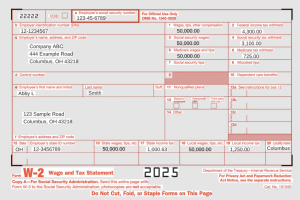
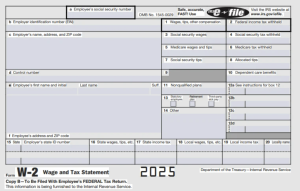
W2 Box-by-Box Breakdown
How to Calculate Each W2 Box from Your Pay Stub
Box 1 - Wages, Tips, Other Compensation
Your YTD gross wages MINUS pre-tax deductions (401k, health insurance, HSA, FSA)
Example: $60,000 gross - $6,000 401k - $3,000 health = $51,000 in Box 1
Box 2 - Federal Income Tax Withheld
Look for "Federal Tax" or "FIT" on your pay stub YTD column
Box 3 - Social Security Wages
Usually same as Box 1, but capped at $176,100 for 2025
Box 4 - Social Security Tax Withheld
Box 3 × 6.2% (maximum $10,918.20 for 2025)
Box 5 - Medicare Wages
Usually same as Box 1 (no cap)
Box 6 - Medicare Tax Withheld
Box 5 × 1.45% (+ 0.9% additional if over $200,000)
Using Your Pay Stub with TurboTax or H&R Block
How to File Taxes with Your Last Pay Stub on TurboTax
If you haven't received your W2 by the IRS deadline, you can use your final
pay stub to file. Here's how:
1. In TurboTax, select "I'll enter my W-2 manually"
2. Use your pay stub's YTD figures to fill in each box
3. If your employer won't provide a W2, file Form 4852 instead
4. TurboTax will guide you through Form 4852 if needed
Important: The IRS deadline to receive your W2 is January 31, 2026. If you
haven't received it by mid-February, contact your employer or file Form 4852.
Pay Stub → W-2 Estimator
Enter YTD totals from your final 2025/2026 pay stub
Results will appear here
Enter your YTD pay stub totals and click Calculate above to estimate your W-2 boxes.
Difference between W-2 and a Pay Stub
If you haven’t kept track of pay stubs or payroll then it’s understandable you may confuse your check subs for a W-2 form.
Of course, you may also find some confusion when your pay stub earnings are not exactly the same as in your W2.
So here are some key points.
What is a Paystub?
Your paystub or check stub is a paycheck you receive every pay period from your employees.
Your pay stub can also include some deductions. And after these deductions, you will then get your net pay, these are your take-home earnings.
Recommended Reading: What is a pay stub?
What is a W-2?
W-2 is a tax form that will show the sum total of all of the taxes which have been withheld from your paychecks for the past year.
These include state and federal taxes and this is a vital part for employees to file income tax returns.
You may also learn more about W-2s on the IRS website.
Calculate W-2 Wages from a Pay Stub
W-2 sufficiently tells you about how much taxes have been taken from you.
But sometimes, you may not be waiting around your W-2 all the time.
So it’s quite possible to calculate your W-2’s manually using your check stubs.
Paystubs may not reflect the information verbatim on W2’s but it generally contains everything you need to know.
1. Calculate your gross income
This is the first time. Your gross pay is all the money you’re making before taxes.
Most employees earn an hourly rate and they work for a certain number of hours in a given week.
Pay stubs generally show the amount you make and they will also include any overtime tips, bonuses, and commissions.
2. Take a look at other Deductions
There are many people who may have pretax deductions which lower the amount of taxes they have to pay.
Some of these include employer benefits and health insurance.
Life insurance, transportation packages, and others.
Subtract this amount from the number you’ve had in the previous step.
This is then the foundation of your W2 which is your total taxable income for the year.
Also Read: Payroll Deductions
3. Eliminate your Non-Taxable Income
Subtracting your nontaxable income is paramount.
There are parts of your earnings in a pay stub that do not necessarily include state and federal taxes.
So it’s important to get the sum total of these and subtract it from your gross income also.
Examples of nontaxable income are:
- Health insurance
- Gifts
- Income from a corporate partnership
- Dental and life insurance or eye care
- Child support payments
- Reimbursement cash for your dependents
4. Calculate your Yearly Taxes
You should find the amount of your local, state, and income taxes on the paystub which are then remitted from your earnings.
The next step is you multiply these by the number of pay periods you have.
If you get paid twice monthly, you’re going to use 24 as your number and the sum total of these will be the taxes withheld for your earnings.
5. Calculate your Total W-2 Earnings
After all those steps above, you may subtract the total taxes from your gross income from the number you got from your pretax deductions and your other remittances.
The sum of these is your net come for the year.
6. Stay on top of tax season – Calculate your W-2 Wages from a Pay Stub
It’s not a good idea to keep waiting around until January to start backtracking and calculating your W2s.
Every time you earn, you can calculate the income from your paystub.
If the numbers on your pay stub and your W2 don’t quite match up, then review your calculations and go back.
The great thing about using a pay stub generator is that its calculator is FREE!
You simply have to purchase and redeem it if you’re happy with the result.